
Check-ins are how your clients report their progress, share updates, and stay accountable. Learn how to review and respond effectively.
What are Check-Ins?
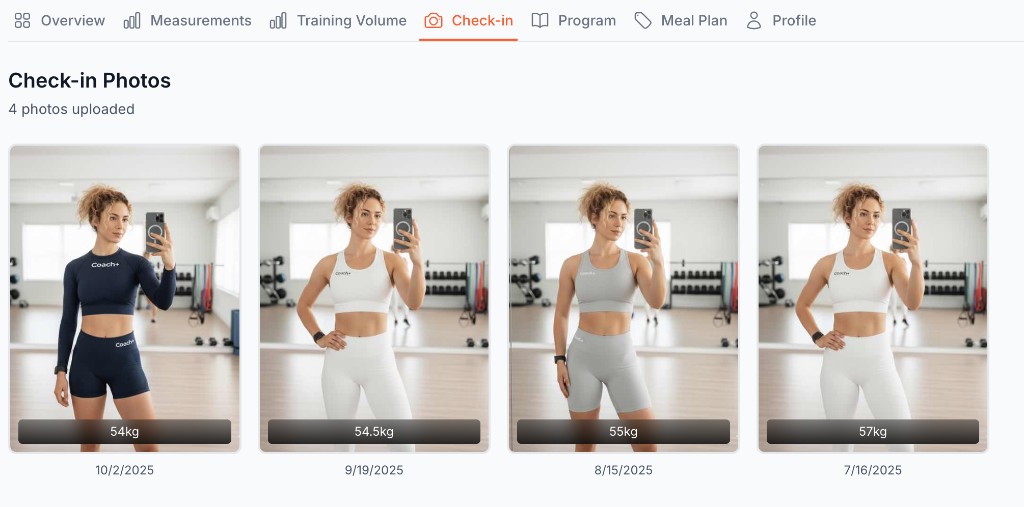
Check-ins are regular submissions from your clients through Coach+. They typically include:
- Progress photos
- Current weight
- Notes or comments from the client
- Timestamp and date
Accessing Check-Ins
To view a client's check-ins:
- Navigate to the Clients page
- Click on the client you want to review
- Click the Check-in tab
You'll see a chronological list of all check-ins submitted by that client, with the most recent at the top.
Check-In Frequency
How often should clients check in? It depends on your coaching style:
Weekly Check-Ins (Recommended)
- Best for accountability
- Allows quick adjustments
- Keeps communication consistent
- Not overwhelming for either party
Bi-Weekly Check-Ins
- Good for experienced clients
- Reduces submission fatigue
- Shows clearer trends
- Works for less intensive coaching
Monthly Check-Ins
- Maintenance or advanced clients
- Long-term trend tracking
- Less time commitment
- May reduce accountability
What's Next?
Learn more about client management:
- Training Volume - Muscle-group volume and training trends
- Managing Client Profiles - Navigate tabs and organize clients
- Assigning Plans - Give clients workout programs