
The Training Volume tab shows how much your client is lifting for each muscle group over time so you can gauge intensity and progression.
Accessing the Training Volume Tab
To view a client's training volume:
- Go to the Clients page
- Click on the client's name
- Select the Training Volume tab
What You'll See
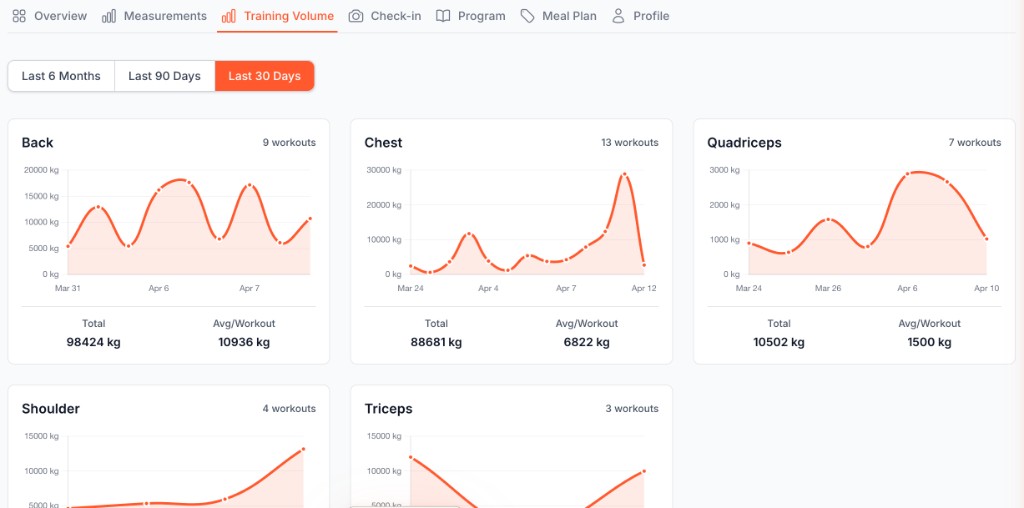
The Training Volume tab tracks the weight lifted per muscle group to measure workout intensity and progression. It displays:
Time period filters: Switch between Last 6 Months, Last 90 Days, or Last 30 Days to view training volume over different timeframes
Muscle group cards: Each muscle group (Back, Chest, Quadriceps, Shoulders, Triceps, etc.) has its own card showing:
- A line chart displaying total volume lifted over time
- Number of workouts completed for that muscle group
- Total weight lifted across all workouts
- Average weight lifted per workout
Volume comparison: Easily see which muscle groups have the highest training volume and track progression over time
What's Next?
Continue improving your client management skills:
- Client Check-Ins - Respond effectively to submissions
- Managing Client Profiles - Navigate all client tabs
- Creating Workout Plans - Build custom programs
- Custom Meal Plans - Create personalized nutrition